Infrastructure Evolution
From R340 satellite clusters to R640 data hubs—choose the right infrastructure for your growth stage.
R340 vs. R640 Cluster Evolution
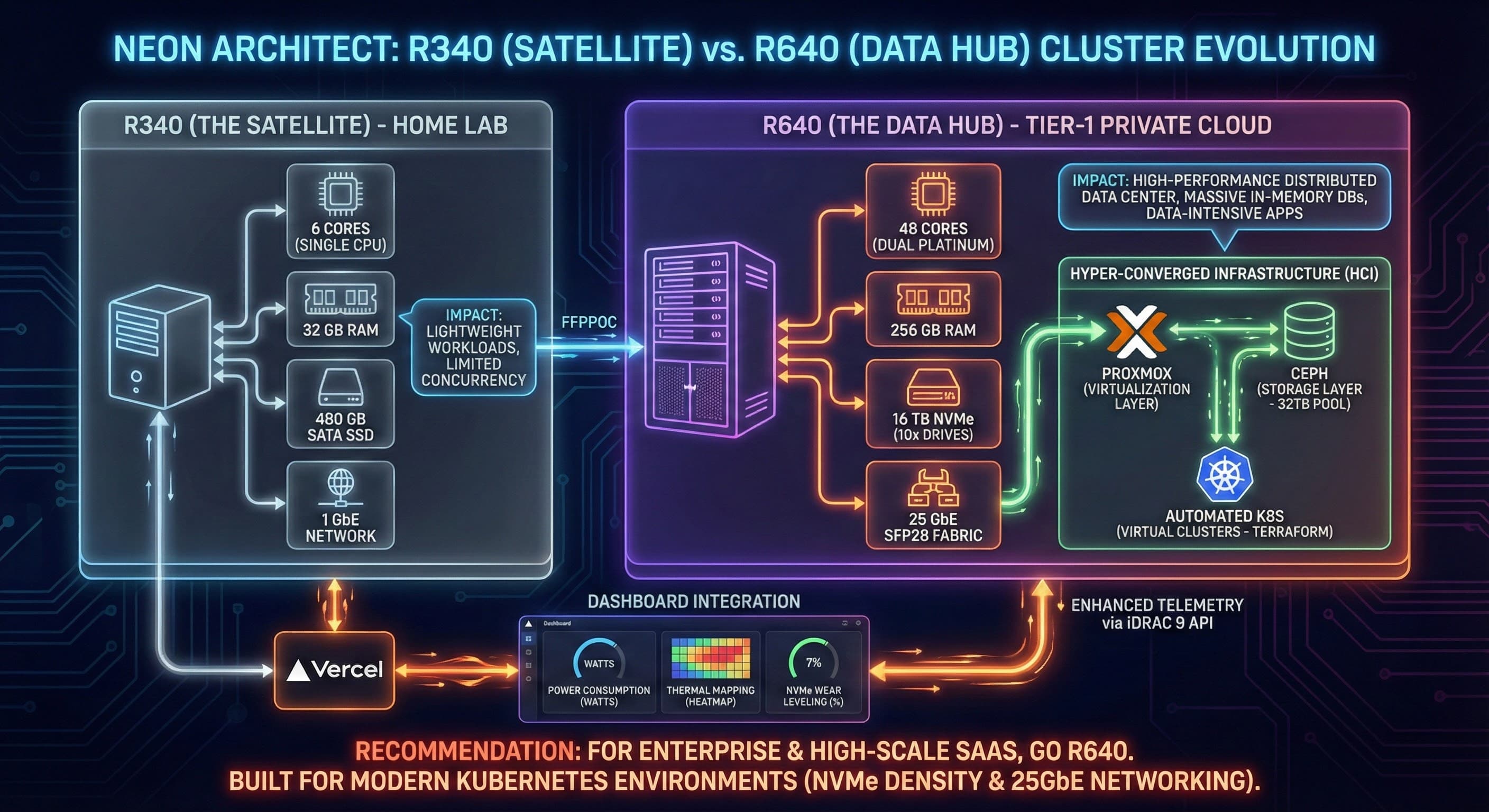
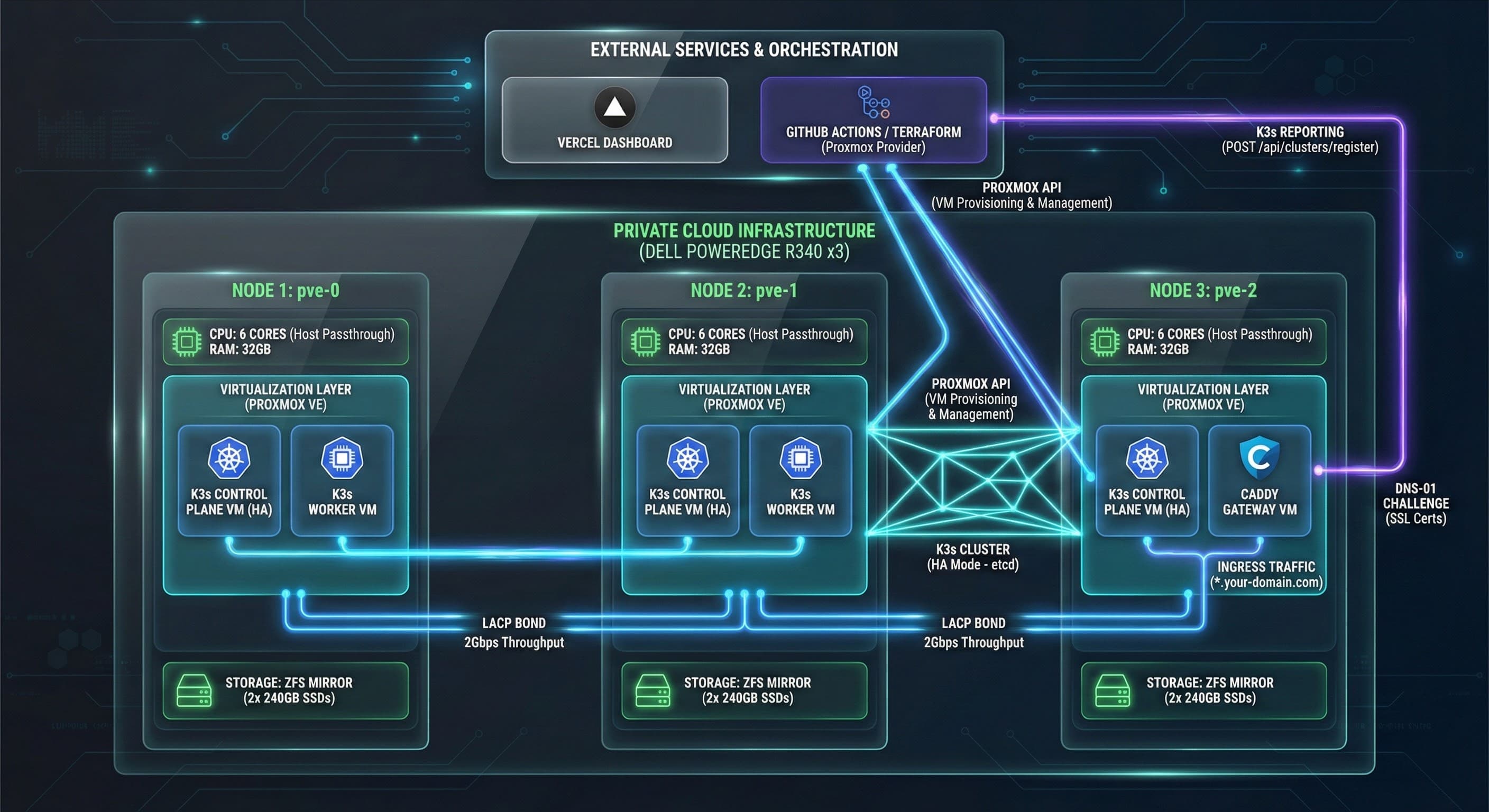
We offer two infrastructure tiers designed for different automation scales and business maturity levels. Start with an R340 satellite cluster for proof-of-concept and small workloads, then evolve to an R640 data hub when you need enterprise-grade performance and multi-region resilience.
R340: The Satellite (Home Lab & Startups)
Hardware Profile
- •CPU: 6 cores (single socket)
- •RAM: 128 GB DDR4
- •Storage: 4.4 TB SATA (limited IOPS)
- •Network: 1 Gbe (standard)
- •Power: 480 GB SSD boot
Virtualization Stack
- •Hypervisor: Proxmox VE
- •Orchestration: k3s (lightweight Kubernetes)
- •Storage: ZFS for RAID-Z2 data protection
- •Monitoring: Single-node Grafana + Prometheus
Best For
- •Proof-of-concept automation projects
- •Startups with <100 workflows
- •Home lab and learning environments
- •Low-latency edge deployments
- •Budget-conscious teams testing self-hosting
Impact
- •Limited database performance (SATA bottleneck)
- •PDF production limited by single-core bursts
- •Frequent restarts for MCP AI context refreshes
- •Good for learning, not production scale
R640: The Data Hub (Enterprise & SaaS)
Hardware Profile
- •CPU: 48 cores (dual Platinum Xeon)
- •RAM: 256 GB DDR4 (expandable to 768 GB)
- •Storage: 10-15 NVMe drives (100+ TB capacity)
- •Network: 10 Gbe or 25 Gbe (high-speed fabric)
- •RAID: Hardware RAID or SF/ZFS SFP28
Advanced Features
- •Virtualization: Proxmox with HCI (hyper-converged)
- •Clustering: Multi-node k8s with Ceph distributed storage
- •Auto-scaling: HPA for n8n workers (up to 120+ pods)
- •Telemetry: Full observability stack (logs, metrics, traces)
Best For
- •High-performance AI/ML model serving
- •Enterprise SaaS with 1000+ customers
- •Data-intensive automation (ETL, reporting)
- •Multi-tenant automation platforms
- •Teams needing 99.9%+ uptime SLAs
Performance Gains
- •8x CPU cores vs. R340 (48 vs. 6)
- •2x RAM capacity (256 GB vs. 128 GB)
- •10x+ storage IOPS (NVMe vs. SATA)
- •10x network throughput (10 Gbe vs. 1 Gbe)
- •Persistent tool memory (no AI context refreshes)
Dashboard Integration
Both R340 and R640 clusters integrate with Vercel dashboards for centralized monitoring and management. Real-time metrics, resource utilization graphs, and workflow performance analytics accessible from any browser.
n8n Workflow Metrics
Execution counts, success/failure rates, average run times, and queue depth monitoring.
Resource Utilization
CPU, memory, disk I/O, and network bandwidth visualizations across all cluster nodes.
Database Health
PostgreSQL query performance, connection pools, replication lag, and storage growth trends.
When to Upgrade from R340 to R640
Performance Bottlenecks
When workflows are waiting in queue for more than 30 seconds, or database queries are taking 500ms+, you've outgrown the R340. The R640's NVMe storage and 48-core CPU eliminates these bottlenecks.
High Availability Requirements
Single-node R340 clusters have no failover. If the server reboots, your automation stops. R640 supports multi-node Kubernetes with automatic pod rescheduling and zero-downtime deployments.
Data-Intensive Workloads
Processing large datasets (ETL, data warehousing, analytics) requires fast storage and RAM. R640's NVMe drives handle 100K+ IOPS vs. R340's 500 IOPS SATA limit.
Customer-Facing SaaS
If you're selling automation as a product, your customers expect enterprise reliability. R640 provides the redundancy, monitoring, and performance needed for production SaaS.
Recommendation Summary
CHOOSE R340 (STARTUP)
Best for learning, lightweight SaaS, multi-cloud contexts with minimal database load.
CHOOSE R640 (ENTERPRISE)
Best for high-performance needs, AI/ML, large-scale SaaS (100+ customers), or mission-critical automation.
For enterprise & high-scale SaaS, go R640. Built for modern Kubernetes environments with NVMe density & 25Gbe networking.
Right-Size Your Infrastructure
Not sure whether R340 or R640 is right for your automation workload? Schedule a Logic Audit and we'll analyze your current usage patterns, growth projections, and recommend the optimal cluster configuration.
Schedule Your Logic Audit